
Open Source - Controlling CAN and RS485 Bus Locks
Open Lock Integration for Smart Cabinet and Locker Systems: Raspberry, Arduino, CAN BUS
Electronic furniture locks from PS Locks can be integrated directly into custom applications, cabinet control systems, and higher-level systems via an open CAN bus interface.
The PS Locks Open Integration Platform (OIP) also provides a modern gateway and software solution that simplifies the connection between electronic locks, IP networks, and customer-specific applications.
From individual lock controls to centrally managed locker systems: hardware, communication, and software can be flexibly adapted to the specific application.
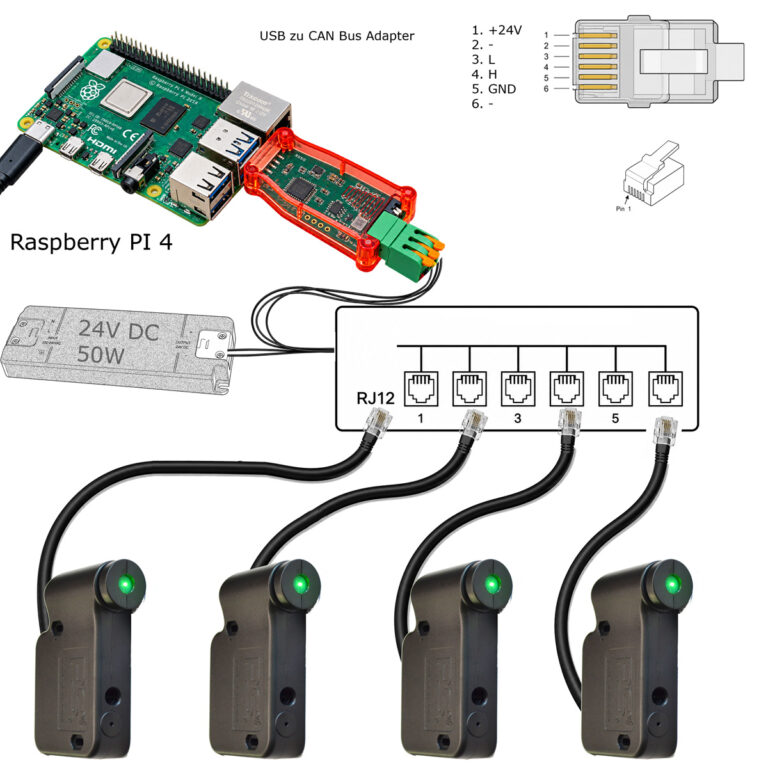
Software for Raspberry Pi on GitHub: https://github.com/sigar-nxp/CAN
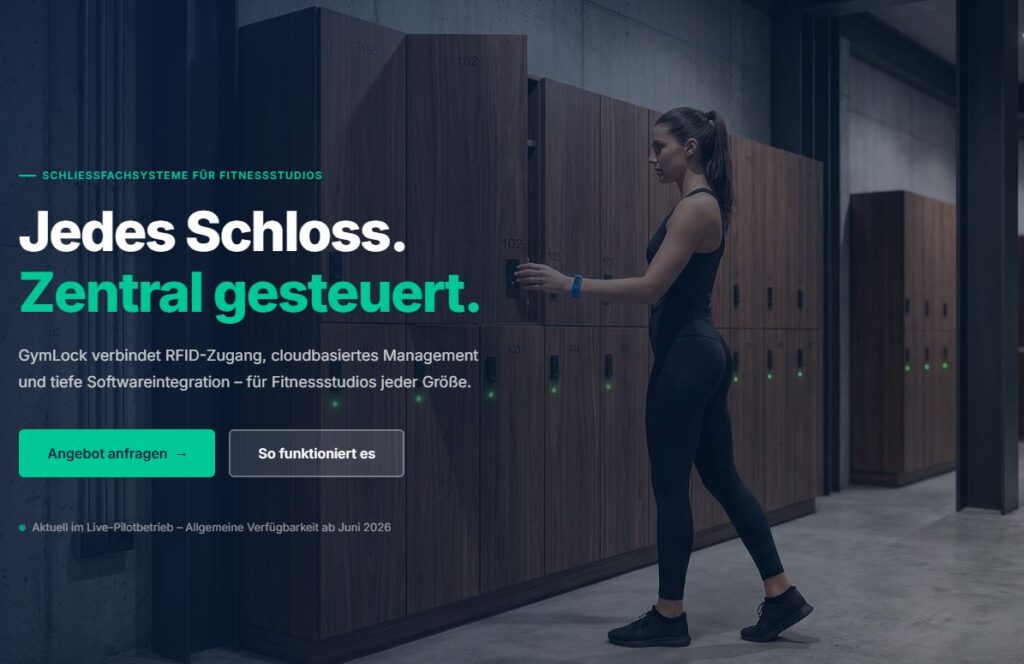
Partner Project: GymLock
A real-world example of integrating the open PS Locks API into a professional locker management platform for gyms.
GymLock demonstrates how complete software solutions can be developed using our open interfaces.
GymLock also offers API integration with major providers such as Magicline.
PS Locks CAN & Open Integration Platform
Open Lock Integration for Smart Cabinet and Locker Systems
Electronic furniture locks from PS Locks can be integrated directly into custom applications, cabinet control systems, and higher-level systems via an open CAN bus interface.
The PS Locks Open Integration Platform (OIP) also provides a modern gateway and software solution that simplifies the connection between electronic locks, IP networks, and customer-specific applications.
From individual lock controls to centrally managed locker systems: hardware, communication, and software can be flexibly adapted to the specific application.
An open platform for your cabinet system
Many electronic cabinet systems require more than just one electronic lock. What matters most is the ability to reliably integrate locks, read status information, manage access permissions, and transmit operational data to higher-level systems.
The PS Locks platform provides an open technical foundation for this.
Your Benefits
Open CAN Bus Communication
Direct integration into customer-specific systems
Central Control of Multiple Locks
Real-time status information
RFID-Based User Identification
Automatic Device Detection
Web-based user interface with OIP
REST API for external applications
Event and Audit Logging
Linux- and Raspberry Pi-Based Integration
No dependence on a proprietary cloud
Suitable for OEMs, integrators, and equipment manufacturers
PS Locks Open Integration Platform (OIP)
The Gateway Between the Castle, the Network, and the Application
The Open Integration Platform (OIP) connects the hardware-based CAN communication of PS Locks locks with modern IP-based applications.
The gateway handles the hardware-level communication with the locks and, at the same time, provides an easy-to-use software interface for higher-level systems.
This allows cabinet systems to be controlled and monitored, for example, via a web browser, a dedicated application, a building management system, or a cabinet management system.
OIP at a Glance
CAN Bus → OIP Gateway → REST API / Web Dashboard → Customer System
Hardware-level communication remains separate from the application layer. This simplifies integration and allows for flexible software expansion.
What can PS Locks do?
Electronic Furniture Locks for Flexible Applications
PS Locks are designed for integration into cabinets, lockers, and other furniture applications.
Depending on the lock and its configuration, various operating functions are available.
Free Choice of Cabinet
In free cabinet selection mode, the compartment is initially empty.
For example, the user identifies themselves using an RFID transponder. The lock secures the selected compartment and can then be unlocked again with the same transponder.
This operating mode is particularly well-suited for applications in which users can select any available compartment.
Typical applications:
Gyms
Swimming pools
Changing Rooms
Employee Areas
public institutions
Fixed Cabinet Assignment
In a fixed assignment, a specific subject is assigned to a user or a permission.
The lock remains locked at all times. An authorized RFID transponder triggers the defined unlocking function.
After the door closes, the lock may automatically re-lock.
This operating mode is suitable, for example, for:
Employee Lockers
Hotels
Schools
Hospitals
Production and Logistics Areas
RFID Access and Permissions
User authentication directly at the lock
PS Locks can use RFID transponders for identification and authorization verification.
The OIP can capture RFID events and forward them to higher-level applications.
This makes it possible to implement various user and permission models.
Possible functions
Temporary User Permissions
Permanent Permissions
Master Cards and Service Cards
Custom Permission Profiles
Event Logging
Managing User Access Through a Parent System
The specific RFID functionality depends on the lock model used and the respective system configuration.
Real-Time Condition Monitoring
Knowing What’s Going On in the Closet
For modern cabinet systems, it is not enough to simply send an unlock command to a lock.
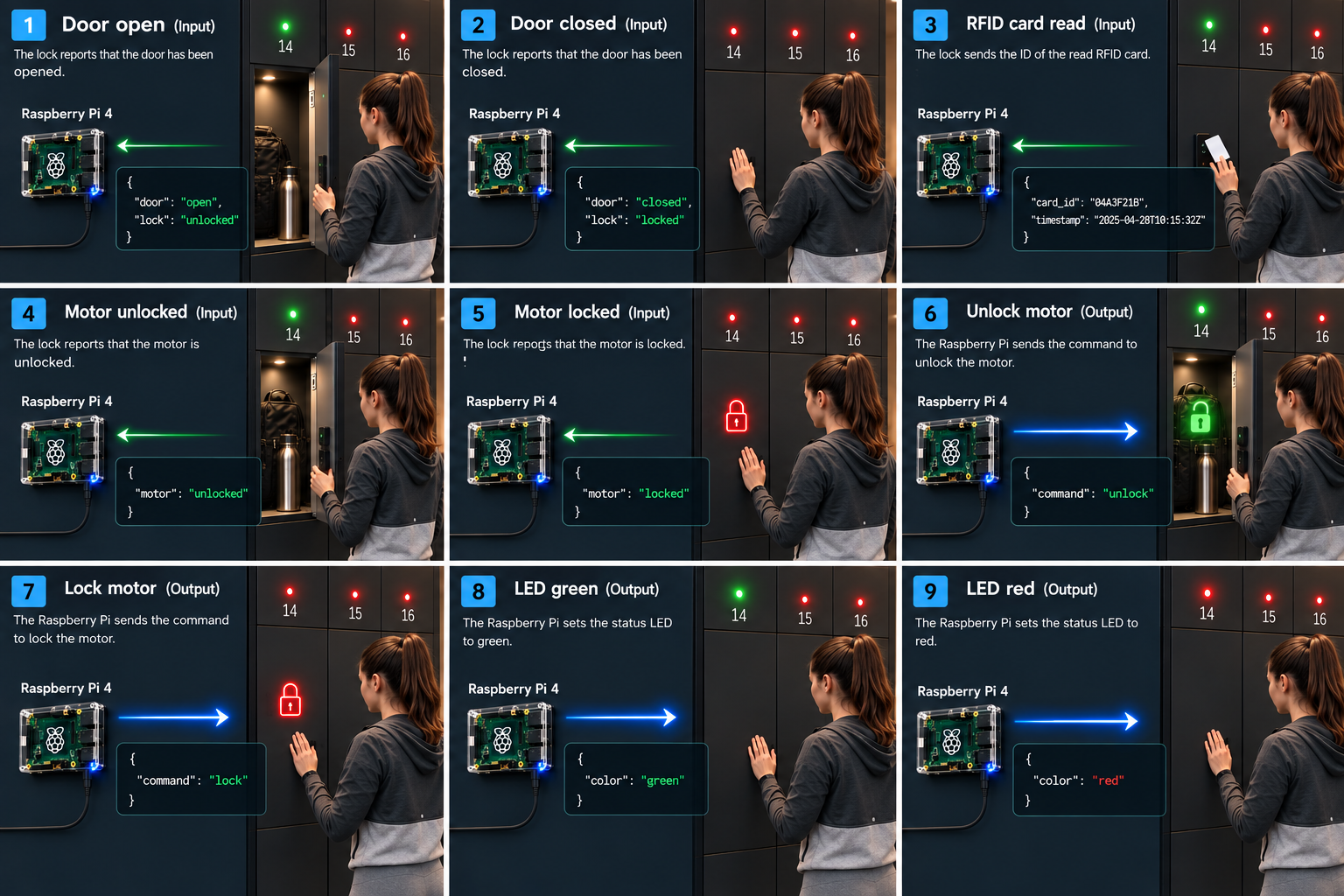
The OIP can collect status information from the connected locks and provide it in real time.
Depending on the hardware used, these include, among other things:
Locked
Unlocked / Bolt engaged
Door open
Door Closed
RFID Events
Error and Status Information
This allows a higher-level system to determine at any time what the actual status of a compartment is.
Door Close Guard
Additional Monitoring When the Door Is Open
On systems that are appropriately equipped or configured, the door position can be monitored.
If a door remains open longer than intended, the system can alert the user with visual or audible signals.
This helps reduce operating errors and makes it easier to spot open compartments.
The exact function and configuration depend on the lock hardware used and the system configuration.
Visual and Audible Feedback
Clear signals for the user
LEDs and audible signals provide immediate feedback right at the lock.
Depending on the lock model and configuration, different states can be indicated.
Examples:
successful identification
Opening
Locking mechanism
Invalid authorization
Error
Warning
Alarm
This provides the user with clear feedback without requiring an additional display.
Open CAN Interface
Direct Access to the Castle’s Communication System
PS Locks communicate via a robust CAN bus.
The open interface allows system integrators to integrate lock communication into their own control systems and applications.
Technical Basis
CAN 2.0A
11-bit identifier
50 kbit/s
Line topology
Linux SocketCAN
CAN interface, for example
can0
The CAN interface is particularly well-suited for applications in which multiple locks need to be reliably operated via a shared bus line.
Up to 126 stops per bus route
A CAN bus line can be used with a large number of locks, depending on the system addressing and network configuration.
With the OIP implementation, up to 126 locks can be managed per bus line.
This makes the platform suitable for both small, standalone units and larger cabinet and locker systems.
The actual number possible depends on the bus architecture, cabling, power supply, device addressing, and the components used.
Automatic Device Detection
Zero-Config Setup
The OIP simplifies the setup of new locks.
Newly connected devices can be automatically detected on the CAN bus. They can then be assigned a fixed logical ID and a descriptive name.
For example, a technical device address becomes:
CAN Node 17 → Spindle 12
or:
CAN Node 24 → Women’s Locker Room – Locker 24
The assignment can be made via the web dashboard or the API.
Web Dashboard
All locks in one place in the browser
The OIP provides a modern, web-based user interface.
Once accessed via a standard web browser, the connected locks are available centrally.
Dashboard Features
Overview of All Connected Locks
Display of the current lock status
Door Status Display
Direct Operation
Open
Continuous On
Lock
Device Identification
Displaying Events
Display of Error Conditions
Status changes can be transmitted directly to the web interface via Server-Sent Events (SSE).
This means you don’t need to manually reload the page.
Custom Names and Configuration
Technical IDs become easy-to-understand attachments
Each lock can be given a unique name.
Examples:
Lockers 01
Lockers 02
Tool Cabinet 07
Men’s Locker Room 12
Hotel Room 204
Supply Cabinet A-17
The configuration is permanently saved and remains in effect even after the gateway is restarted.
This makes the OIP suitable even for larger systems with many identical locks.
Event and Audit Log
Complete Traceability
For professional systems, the traceability of operating procedures and events is important.
The OIP can record relevant events with timestamps and store them in a central event log.
These may include, for example:
RFID Scans
Opening Procedures
Locks
manual operations
Alarms
Error
Changes in State
System Events
The audit log is available both in the web interface and via the software interface for further processing.
REST API
Integration with Your Own Software
The OIP provides a modern HTTP-based REST API.
This allows external applications to query and control the connected locks without having to communicate directly with the CAN bus.
Possible Integrations
Cabinet Management Software
Access Control Systems
Hotel Software
Building Automation Systems
Production Systems
ERP/MES Systems
in-house web applications
mobile applications
Cloud Applications
The API establishes a clear separation between the application and the hardware-level CAN communication.
OpenAPI & Swagger
Developer-Friendly Interface
The REST API can be documented and tested using OpenAPI/Swagger documentation.
This allows developers to quickly understand the available endpoints and build their own integrations.
Typical tasks include, for example:
Search for a castle
→ Retrieve device and status information
Unlock the lock
→ Send an open command to a specific compartment
Change Configuration
→ Manage Operating Parameters and Assignments
Retrieve Events
→ Analyze Historical Events
Receive Live Status Updates
→ Process status changes via SSE
System Architecture
Hardware and software are clearly separated
The OIP is based on a modular architecture.
Castle Plain
PS Lock’s Electronic Furniture Locks
↓
Fieldbus Level
CAN Bus / CAN 2.0A
↓
Gateway Level
Linux / Raspberry Pi / Industrial PC
↓
Software Layer
Linux SocketCAN + OIP
↓
Integration Level
REST API + SSE
↓
Application Layer
Web Dashboard / Customer Software / Third-Party System
This architecture makes it possible to run the Schloss hardware independently of the actual user application.
Software Technology
The OIP is based on established open-source technologies.
Technology Stack
Linux
SocketCAN
Python
FastAPI
REST API
Server-Sent Events (SSE)
SQLite
HTML / JavaScript
TailwindCSS
This ensures that the platform remains transparent and can be flexibly expanded by developers and system integrators.
Hardware Requirements
Compact Gateway Hardware
A Raspberry Pi or another Linux-based industrial computer, for example, can be used as a gateway.
Typical Structure
Raspberry Pi or Linux IPC
CAN Interface / CAN Shield
CAN Bus Wiring
Ethernet or Wi-Fi
PS Lock’s Electronic Furniture Locks
The specific hardware selection depends on the number of locks, the installation environment, the power supply, and the requirements of the respective system.
Developer Support
Develop Your Own Application
The open architecture allows developers to create their own applications and control systems based on the PS Locks platform.
Depending on the project’s status, the repository contains, among other things, sample code and tests.
Of interest to integrators
Python Examples
CAN Communication
API Integration
Device Detection
Lock Control
Status Monitoring
Event Processing
automated tests
Open Source and Transparent Integration
No Black Box
An open interface facilitates the long-term integration of electronic locks into customer-specific systems.
Instead of relying solely on a proprietary turnkey solution, developers can understand how the system communicates and build their own software architecture on that foundation.
This is particularly interesting for OEMs and system integrators who want to maintain control over their own software, user interface, and business logic.
Typical Applications
One platform—many uses
Fitness & Sports
Lockers for gyms, swimming pools, and sports facilities.
Company
Electronic employee lockers for offices, production facilities, and logistics areas.
Hotels
Cabinet and storage solutions that integrate with existing software systems.
Educational Institutions
Lockers for schools, universities, and training centers.
Industry
Tool cabinets, supply cabinets, and controlled storage.
Public Institutions
Lockers in government offices, recreational facilities, and areas open to the public.
Who is the Open Integration Platform intended for?
For anyone who wants to install their own cabinet system
The OIP is intended specifically for:
System Integrators
Integration of locks into existing building, access, or management systems.
Cabinet and Locker Manufacturers
Development of proprietary locker systems featuring electronic PS Locks technology.
OEMs
Integration of lock hardware into our own products and overall systems.
Software Developer
Development of proprietary applications based on the REST and CAN interfaces.
Building Automation
Integration of electronic cabinet systems with higher-level building and management systems.
From hardware to complete integration
You determine the system architecture
PS Locks provides the electronic lock hardware and the open communication platform.
The OIP also provides a gateway that simplifies integration into modern IP-based applications.
This allows for the implementation of various system architectures:
Direct CAN Integration
For custom control systems and embedded systems.
OIP Gateway
For quick integration via Ethernet and REST API.
Web Dashboard
For commissioning, diagnostics, and manual operation.
Third-party system
For integration with existing cabinet, building, or access control software.
Technical Specifications
| Feature | Specification |
|---|---|
| Communication bus | CAN |
| CAN Version | CAN 2.0A |
| Identifier | 11 bits |
| Transmission rate | 50 kbit/s |
| Operating System Gateway | Linux |
| CAN Stack | SocketCAN |
| Gateway Hardware | Raspberry Pi / Linux IPC |
| Network | Ethernet / Wi-Fi |
| API | REST / HTTP |
| API Documentation | OpenAPI / Swagger |
| Live Communication | Server-Sent Events (SSE) |
| Database | SQLite |
| Web interface | Browser-based |
| RFID | depending on the lock model |
| Maximum bus size | Up to 126 locks with appropriate system addressing |
Repository & Developer Resources
Get started with integration right away
You can find the software and developer resources in the repository:
GitHub:
https://github.com/sigar-nxp/CAN
There, developers can view the available components, examples, and tests and prepare to integrate them into their own system environment.
FAQ
Can PS Locks be controlled directly via CAN?
Yes. The locks feature a CAN-based communication interface that allows them to be integrated into customer-specific control systems and software.
Do I need the OIP for CAN communication?
No. The OIP is an additional gateway and software layer. Direct integration via CAN is also possible.
Can I develop my own software?
Yes. The open interface is particularly useful for integrators, OEMs, and software developers who want to create their own applications.
Can I manage multiple locks at the same time?
Yes. The locks can be connected centrally via the CAN bus. The maximum number depends on the specific bus topology and system configuration. In the configuration described, the OIP supports up to 126 addressable locks per bus line.
Can I check the status of a lock?
Yes. Depending on the lock model used, status information such as bolt, door, and RFID status can be read.
Is there a web interface?
Yes. The OIP features a web-based dashboard for commissioning, monitoring, and manual control.
Is there a REST API?
Yes. The OIP provides an HTTP-based REST interface for integration with external applications.
Can I integrate the locks into an existing building or cabinet management system?
Yes. The locks can be integrated into higher-level systems via CAN or the OIP REST API.
What hardware do I need for the OIP?
Typically, a Raspberry Pi or a Linux-based industrial PC with a CAN interface and a network connection.
Ready for your own closet solution?
Develop your application on an open platform.
Whether it’s a single locker, a large locker system, or a fully integrated locker management system:
With PS Locks, you get electronic furniture locks with an open communication interface and a flexible foundation for custom integrations.
Select Hardware
Discover the available PS Locks locking solutions.
Technical Documentation
Learn more about CAN communication and integration.
Try out OIP
Use the gateway to establish a fast connection between the CAN bus and an IP network.
Developer Repository
https://github.com/sigar-nxp/CAN
PS Locks – Open Integration
Electronic locks. Open interfaces. Proprietary systems.
Design the cabinet solution that fits your application.
Support
Open Source Counterpart: Günther Sutterlüty, Mobile: +43 664 17 22 900, s@pslocks.com